


Introduction
MiniLED vs Micro RGB TV. Rollable display laptops. Edge AI home automation devices. Three categories, near-zero competition in search, and all shipping right now.
10,000Peak nits, Hisense Micro RGB
24″Rollable screen, Legion concept
4×Faster local vs cloud automation
$3,299World’s first rollable laptop price
What’s Covered in This Guide
- MiniLED vs Micro RGB TV: The Backlight Revolution Explained
- Best Micro RGB & RGB MiniLED TVs in 2025–2026
- Rollable Display Laptop: The World’s First, Reviewed
- What’s Coming: Legion Pro Rollable & Beyond
- Edge AI Devices for Home Automation: The Local Intelligence Revolution
- Best Edge AI Home Devices in 2025–2026
- Full FAQ: All Three Categories
Display Technology
MiniLED vs Micro RGB TV: The Backlight Revolution Most Buyers Don’t Understand
Walk into any electronics store in 2025, and you’ll see TVs labeled “MiniLED,” “RGB MiniLED,” “Micro RGB,” and “TriChroma LED.” Same aisle. Completely different technologies. And sales staff who genuinely can’t explain the difference. Let’s fix that.
Definition
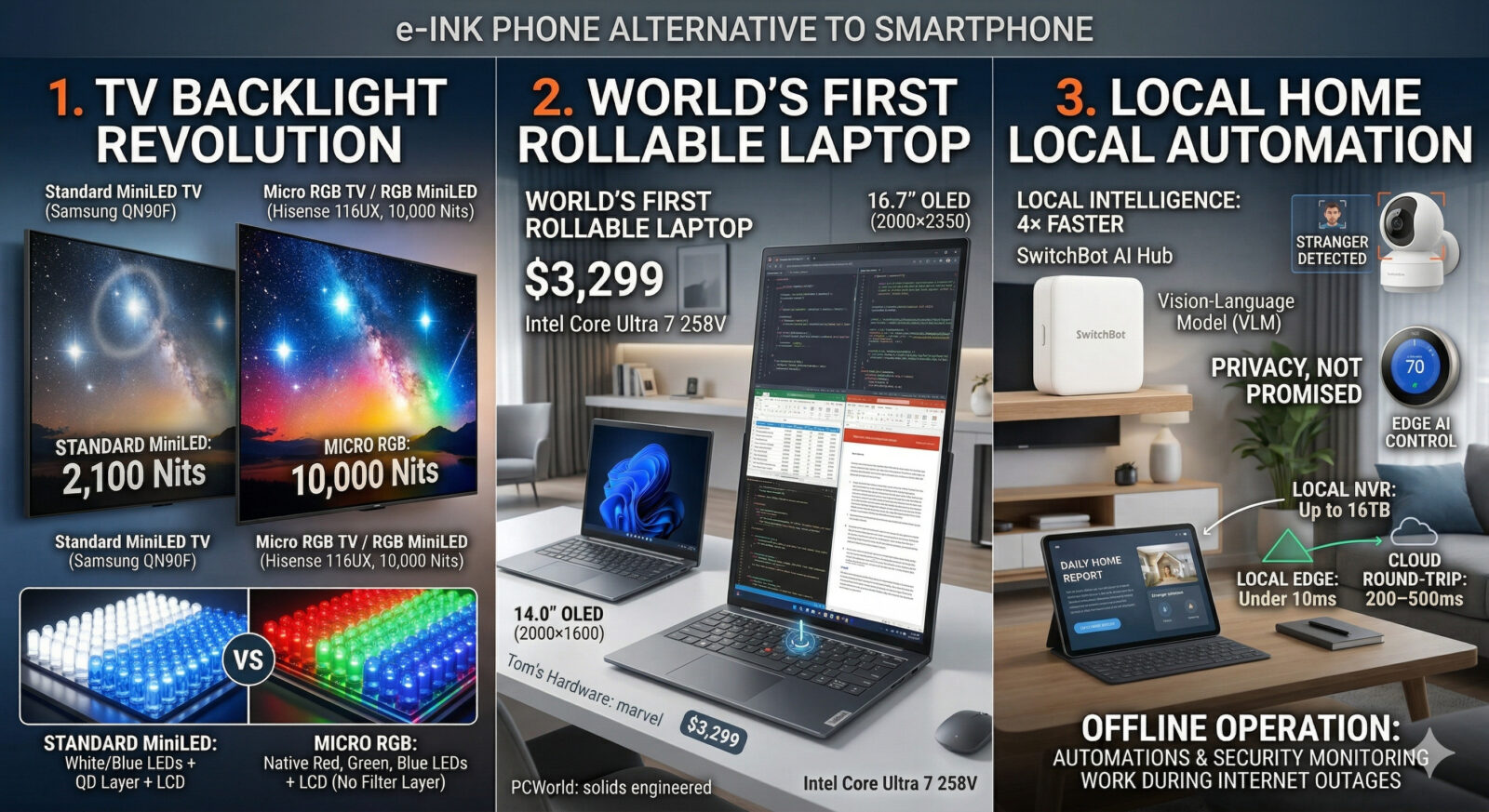
A MiniLED TV uses thousands of miniature LED backlights (100–200 micrometers) arranged in dimming zones behind a standard LCD panel, using a white or blue light source filtered through a color layer. A Micro RGB TV (Samsung’s term) or RGB MiniLED TV (Hisense’s term) replaces that single-color backlight with individual red, green, and blue LEDs per zone, eliminating the quantum dot or color filter layer entirely. The result: wider color gamut, higher peak brightness, and more accurate color at every brightness level. As of 2025, Samsung uses sub-100 μm elements and calls them “Micro RGB,” while Hisense uses 100–200 μm elements labeled “RGB MiniLED.” The size difference is real, but the architectural concept is essentially the same.
Why the Standard MiniLED Architecture Has a Ceiling
To understand why Micro RGB is a meaningful jump, you need to understand the constraint it’s solving. A standard MiniLED TV works like this: LEDs emit white (or blue) light → a quantum dot layer or color filter converts it to RGB → the LCD panel shapes each pixel’s color. Mini-LED relies on local dimming zones, which can create halos around bright objects on dark backgrounds. No matter how many zones you add, Samsung’s QN90F has hundreds, which delivers excellent contrast, but you’re still fighting that physics limitation.
The bloom problem (a faint halo around bright objects on dark backgrounds) isn’t a software bug. It’s the physical consequence of using one light source to illuminate multiple pixels. And while thousands of dimming zones reduce it dramatically, they can’t eliminate it entirely because each zone still illuminates a region, not a single pixel.
Micro RGB attacks this at the source.
How Micro RGB Solves It
By using native red, green, and blue LEDs instead of white ones, the new type of TV backlighting builds on existing LCD design but changes how the LCD imaging panel is lit up, moving from white or blue backlights to individual lighting elements for the three primary colors. Each zone has its own RGB triplet. Color mixing happens at the backlight level itself, not via a filter layer.
The practical results are significant. The Hisense 136MX Micro LED TV offers a peak brightness of up to 10,000 nits. For context, even the best OLED panels top out around 2,000–4,000 nits on 2025 flagship models. And because RGB primary colors are mixed directly rather than filtered, the color volume at high brightness is dramatically better than any existing LCD or OLED technology.
Here’s the honest caveat: it’s still LCD. RGB Mini LED and Micro RGB TVs improve LCD picture quality with higher brightness and wider color gamut, but still face LCD limits. Perfect per-pixel black control still belongs to OLED and true MicroLED. If your primary use is watching dark films in a blacked-out room, Tandem OLED (LG G5, Panasonic Z95B) still wins for black levels and infinite contrast. If you watch in a bright room, game at high brightness, or want the most vivid HDR highlights possible, Micro RGB is the technology to watch.
| Technology | How It Works | Peak Brightness | Black Levels | Color Volume | Best For |
|---|---|---|---|---|---|
| Standard MiniLED | White/blue LEDs + QD layer + LCD | 1,000–2,100 nits | Good (zone limited) | Good | Value HDR, bright rooms |
| Micro RGB / RGB MiniLED | Native R+G+B LEDs + LCD (no QD layer) | Up to 10,000 nits | Good (zone limited) | Excellent native primaries | Max brightness, HDR gaming |
| OLED (Tandem) | Self-emissive organic pixels | 2,000–4,000 nits | Perfect (pixel off) | Very good | Cinema, dark rooms, gaming |
| True MicroLED | Self-emissive inorganic micro-LEDs | 10,000+ nits | Perfect (pixel off) | Best-in-class | Ultimate any environment |
Is Micro RGB the Same as MicroLED?
No, and confusing them is the most common mistake we see in buyer forums. Micro RGB is a refined LCD backlight. True MicroLED eliminates the LCD panel entirely. MicroLED uses self-emissive microscopic LEDs where each pixel produces its own light, capable of infinite contrast, higher brightness than OLED, and no organic material degradation or burn-in risk. True MicroLED remains $30,000+ for 136-inch panels in 2025. Micro RGB is what you can actually buy for under $5,000.
The Brand Name Confusion, Decoded
This is the part that trips up even tech reviewers. The Hisense 116UX will be the first RGB MiniLED TV you can buy in 2025, using their TriChroma LED / RGB MiniLED branding, a huge screen with spectacular brightness and color performance. Sony is also working on RGB MiniLED TVs, though it’s not expected until 2026. Samsung’s version, with sub-100μm elements, is marketed as “Micro RGB.” LG previewed its “Micro RGB evo MRGB95B” ahead of CES 2026. Different names, same fundamental shift from white-light backlights to native RGB primaries.
The bottom line for buyers: if you see “RGB MiniLED,” “Micro RGB,” or “TriChroma LED” on a TV spec sheet, you’re looking at a meaningfully different (and superior) display architecture versus standard MiniLED. The brightness and color performance will be noticeably better in real-world conditions, especially for HDR content and gaming.
Best Devices 2025–2026
Which RGB MiniLED and Micro RGB TVs Can You Actually Buy?
The category is new enough that availability is still limited, but it’s growing fast. Here are the specific devices leading the charge.
Best Available Now
Hisense 116UX RGB MiniLED
Premium Tier
The first consumer-facing RGB MiniLED TV. 116-inch panel with TriChroma native RGB backlighting. Reviewed as delivering “spectacular brightness and colour performance” by Currys. Available 2025.
116″ TriChroma RGB LED High nit HDR 4K Large format
First Mover in RGB Backlight
CES 2026 Preview
Samsung 115″ Micro RGB TV
TBD
Samsung’s sub-100μm “Micro RGB” launch. Samsung previewed its 130-inch Micro RGB TV at CES 2026, showcasing bold industrial design and advanced AI features. Availability and pricing TBD. Samsung’s entry validates the category.
Sub-100μm elements AI upscaling 115″–130″2026 launch
Samsung Validates the Category
2026 Contender
LG Micro RGB evo MRGB95B
2026
LG’s entry into native RGB backlighting is notable because LG has been an OLED advocate for years. Its participation in the Micro RGB category signals the technology’s mainstream arrival. Previewed at CES 2026 with “bold color claims and AI processing.”
LG MRGB panel AI processing 2026 availability
LG Joins the RGB Revolution
Buyer Reality Check: Screen Size Limitation
In 2025–2026, RGB MiniLED and Micro RGB TVs are available almost exclusively in very large formats (100″+). The manufacturing complexity of placing individual RGB LED triplets at high density limits practical use in 55–75″ sizes for now. If you want a 65-inch living room TV with the best picture, the LG G5 using Tandem OLED delivers impressive brightness, cinematic blacks, and greater energy efficiency for mainstream sizes. Micro RGB’s moment for typical-sized TVs is 2026–2027.
Rollable Display Laptop
The World’s First Rollable Display Laptop: You Can Actually Buy It
For years, rollable screens were a CES concept theater, impressive demos that disappeared quietly after the trade show floor cleared. 2025 changed that. The Lenovo ThinkBook Plus Gen 6 Rollable is a 14-inch laptop that unrolls into a tall 16.7-inch display when you press a button on the keyboard, and Lenovo proudly proclaims this is the world’s first rollable laptop. It’s real. It works. And it costs $3,299.
What Is It? A rollable display laptop is a portable computer whose screen physically expands or contracts using a motor-driven flexible OLED panel that rolls into or out of the device chassis on demand. Unlike dual-screen or foldable laptops that use hinges between two fixed panels, rollable displays use a single continuous flexible substrate that stores the excess screen material in a housing within the lid. The Lenovo ThinkBook Plus Gen 6 Rollable, priced at $3,299 and powered by Intel Core Ultra 7 258V (Lunar Lake), is the first commercially available implementation expanding vertically from 14 inches (2000×1600) to 16.7 inches (2000×2350) with a single button press.
What It’s Actually Like to Use – PCWorld’s Verdict
PCWorld’s reviewer said: “I’m shocked how cool this is: Lenovo has taken the kind of product you’d see as a tech demo at CES and turned it into a real, solidly engineered laptop that anyone can buy. Yes, it’s expensive, but the fact that you can get this kind of one-of-a-kind experience at a few thousand bucks is just awesome.”
And Tom’s Hardware called the rollable display mechanism “something of a marvel.” But both publications noted the same trade-offs, and they’re worth understanding before you spend $3,299.
| Spec | Detail |
|---|---|
| Display (collapsed) | 14.0″ OLED, 2000×1600, 120Hz |
| Display (expanded) | 16.7″ OLED, 2000×2350, 120Hz |
| Processor | Intel Core Ultra 7 258V (Lunar Lake) |
| RAM / Storage | 32GB / 1TB SSD (one config only) |
| Expansion trigger | Keyboard button (hand gesture – finicky) |
| Weight | 3.72 lbs (hefty for 14″) |
| Ports | 2× Thunderbolt 4 + headphone (limited) |
| Price | $3,299 (single configuration) |
| Availability | Available now at Lenovo.com |
The Real Trade-Offs Nobody’s Writing Clearly
The PCWorld reviewer was honest: “Battery life takes a hit. A portable monitor may be more practical.” The Lunar Lake processor, while excellent for efficiency, means this isn’t a multithreaded powerhouse. CPU-heavy multithreaded workflows will lag compared to other CPU architectures.
Tom’s Hardware added a detail worth noting: “At certain angles, you can see where the screen bends to fit in the laptop. This isn’t terribly different from the way you can sometimes see the crease on foldable phones, but it doesn’t feel terribly premium.” The bend line is subtle but visible.
And the gesture control, where you wave your hand to expand the screen? In practice, it’s extremely finicky. You need your hand in the perfect spot, then the sensor needs to recognize your hand, and only then do you move it up or down. The keyboard button, on the other hand, is foolproof.
None of these is a deal-breaker. They’re the honest first-gen realities of a product that simply didn’t exist before 2025. TechRadar noted: “Anyone who values a vertical display, like software engineers or business users who work with a lot of documents, is going to be hard-pressed to find another laptop like the ThinkBook Plus Gen 6 Rollable.”
Who This Is For Lawyers, coders, writers, financial analysts, and anyone who lives in vertical-scrolling documents. The 16.7-inch tall display makes reading lengthy PDFs, code reviews, legal briefs, and spreadsheets a genuinely different experience. If your use case is primarily content consumption or horizontal creative work, a portable monitor at $200 achieves similar extra screen real estate for a fraction of the cost.
What’s Coming Next
The Legion Pro Rollable: Gaming Goes Horizontal (CES 2026 Concept)
Lenovo didn’t stop at vertical. Instead of replacing the notebook’s original 16-inch OLED screen with a rollable variant that extends upwards like the ThinkBook Plus Gen 6 from 2025, Lenovo opted for one that expands outwards to either 21.5 inches or 23.8 inches. This means instead of being restricted to a standard 16:10 aspect ratio, you also have the choice of 21:9 or an ultra-wide 24:9 with just the touch of a button.
It’s a concept device for now. Even though Lenovo had a handful of demo units on site at CES 2026, there weren’t any games installed, so reviewers weren’t able to see the Legion Pro Rollable’s tech in full glory. But the engineering is clearly further along than a pure mockup.
The specs on the concept: based on the Legion Pro 7i with top-spec Intel Core Ultra processors and an NVIDIA GeForce RTX 5090 Laptop GPU paired with a screen that goes from 16 inches for normal portable use, to 21.5 inches in “Tactical Mode,” to 24 inches in “Arena Mode.” For esports athletes or content creators who travel but want desktop-scale screens at their destination, this is the device they’ve been waiting for.
The idea of a gaming laptop with a screen that can go from normal to ultra-wide at the touch of a button is super cool, especially for flight sims, racing games, or big open-world adventures. Engadget, CES 2026 hands-on
Realistically, expect the Legion Pro Rollable as a retail product in late 2026 at the earliest, and expect the price to start north of $4,000, given the complexity of the mechanism plus the flagship GPU. But the ThinkBook Plus Gen 6 is already available right now, and the rollable display laptop category has officially left concept-land.
Edge AI for Home Automation
Edge AI Home Devices: Why Local Intelligence Is Beating the Cloud in 2025
Every major smart home system built before 2023 had a dirty secret: it depended entirely on your internet connection. Turn off your router, and your “smart” home becomes dumb in an instant. Ask your thermostat to adjust, and it has to round-trip to a server farm in Virginia before the request comes back. This architecture has served the industry’s data-collection interests far better than yours.
Definition
An edge AI device for home automation is a local hub or computing unit that runs artificial intelligence models directly on-device, processing data within your home rather than sending it to remote cloud servers. Edge AI lets smart devices process and analyse data right on them instead of pushing to remote cloud servers, giving faster decision-making, lower latency, and greater privacy because data doesn’t need to leave the home. As of 2025, the leading consumer examples include the SwitchBot AI Hub (Vision-Language Models, local NVR, up to 4× faster automations), Home Assistant-compatible NVIDIA Jetson platforms, and Hailo-8 accelerator-based security cameras. The market is in early growth, with purpose-built edge AI hardware replacing cloud-dependent architectures across security cameras, thermostats, and whole-home orchestration hubs.
The Three Reasons Local AI Beats Cloud AI for Your Home
1. Speed that actually matters. Reduced latency means smart devices respond instantly. When motion detects you walking into a room, an edge-computed smart lighting system triggers within milliseconds rather than waiting for cloud servers to respond. This instantaneous feedback creates the sense of genuine intelligence rather than mechanical automation. The latency difference between a local edge decision (under 10ms) and a cloud round-trip (200–500ms) is the difference between a home that feels alive and one that feels laggy.
2. Structural Privacy, not promised. Cloud-based AI means your home’s camera feeds, voice patterns, occupancy data, and behavioral habits are being processed and potentially stored on third-party servers. Processing data locally means edge devices handle time-sensitive information without it leaving the home, providing a harder layer of protection for consumer privacy. No amount of privacy policy language changes the architectural reality that cloud processing is inherently less private than local processing.
3. Reliability independent of the internet. Bandwidth efficiency reduces the burden on your internet connection. Instead of streaming every sensor reading to cloud servers, devices filter raw data locally and transmit only actionable insights. And when your ISP goes down, which it will, your edge AI home keeps working. Your cloud-dependent home goes offline.
The SwitchBot AI Hub: What “World’s First Local Home AI Agent” Actually Means
SwitchBot’s AI Hub combines edge AI computing, Vision-Language Models (VLM), and unified smart home control in a single hub. It understands real-world events through connected cameras, enables AI-powered automations, and serves as a local NVR system with Frigate. Unlike cloud or PC-based deployment, SwitchBot AI Hub offers local operation for always-on AI at a more affordable and convenient price point.
The practical capability is genuinely impressive. AI Hub uses Vision-Language Models to interpret real-world events, generate summaries, enable AI search through video footage, deliver daily home reports, and provide more accurate alerts. These AI summaries can also be used as automation triggers, allowing users to create complex home automations in seconds. You’re not just getting motion detection. You’re getting a system that can tell the difference between your cat and a stranger, summarize what happened at your front door, and let you ask natural language questions about your camera footage.
Unlike standard Bluetooth gateways, the AI Hub offers true local hub functionality. Automations run locally, delivering response times up to 4× faster. It also supports Home Assistant installation directly on-device, Matter bridging, and connects with over 100 SwitchBot devices, making it genuinely platform-agnostic within its ecosystem.
Best Devices 2025–2026
The Best Edge AI Home Automation Devices Right Now
Best Consumer Hub
SwitchBot AI Hub
~$99–$149
The most accessible edge AI home hub in 2025. Vision-Language Model, local NVR (up to 16TB), facial recognition, 4× faster automation, Home Assistant support, Matter bridge. Works with 100+ SwitchBot devices and OpenClaw AI models via WhatsApp/iMessage.
VLM on-device Frigate NVRMatter Bridge Home Assistant 8 cameras
Best Consumer Starting Point
Power Users
Home Assistant + Yellow/Green
$99–$179
Open-source local AI home hub platform. Run local LLMs (Llama 3.1 8B, Qwen3) for voice control without internet. Integrates with every major smart home protocol. The power user’s choice steep learning curve, infinite flexibility.
Local LLMsMatter + ThreadZigbee / Z-WaveOpen sourcePrivacy-first
Best Full Control Option
Premium / Developer
NVIDIA Jetson Orin (Home Server)
$499–$800
NVIDIA’s Jetson AGX Orin delivers up to 275 TOPS of AI performance. Overkill for most homes, ideal for users running local LLMs, multi-camera AI surveillance, energy modeling, or smart home + home lab hybrid setups. The ceiling for consumer edge AI computing in 2025.
275 TOPS Local LLM server GPU-accelerated DIY / Developer
For Power Builders
The Open Source LLM Question
For users running their own edge AI home servers, 2025 research identifies specific models by use case: GLM-4.5-Air is the top choice for complex multi-device orchestration and agent-based automation requiring tool integration; Meta-Llama-3.1-8B-Instruct is the best choice for always-on voice assistants running on edge devices with budget constraints, offering exceptional efficiency. You don’t need a $20,000 GPU server to run useful local AI in your home; a capable mini PC with 16GB RAM can run 8B parameter models well enough for voice control and automation logic.
What Edge AI Home Devices Can Do in 2025 That Cloud Devices Can’t
- Camera intelligence without subscription fees: Local facial recognition, object detection, and behavioral anomaly detection. No monthly cloud storage fee required
- Offline operation: Automations, voice commands, and security monitoring that work during internet outages
- Cross-platform AI reasoning: A local LLM can understand natural language like “turn everything off when the last person leaves” and interpret it correctly across different device brands and protocols
- Video summarization: Ask “what happened at my front door yesterday afternoon?” and get an AI-generated narrative from local camera footage without uploading to any cloud service
- Predictive behavior: Learn your patterns over time and act proactively, pre-cooling before you arrive, adjusting lighting for your schedule without continuous cloud telemetry
Frequently Asked Questions
What is the difference between miniLED and Micro RGB LED TV?
MiniLED TVs use conventional white or blue LED backlights behind an LCD panel with local dimming zones. Micro RGB (Samsung) and RGB MiniLED (Hisense) change how the LCD panel is lit using individual red, green, and blue LED elements per zone instead of a single-color source with a quantum dot layer. The result is higher peak brightness (up to 10,000 nits), better color volume, and more accurate hue at every brightness level. Both are still LCD, not self-emissive like OLED or true MicroLED.
Is Micro RGB the same as MicroLED?
No, they are completely different. Micro RGB is an improved LCD backlight. MicroLED uses self-emissive microscopic LEDs where each pixel produces its own light, offering infinite contrast, higher brightness than OLED, and no organic material degradation. True MicroLED eliminates the LCD panel entirely. In 2025, Micro RGB TVs will be available at premium prices; true MicroLED consumer TVs will start at $20,000+ for 136-inch panels.
Can you buy a rollable display laptop in 2025?
Yes. The Lenovo ThinkBook Plus Gen 6 Rollable is priced at $3,299, shipping in 2025. It features a 14-inch OLED display that expands vertically to 16.7 inches with the press of a button, powered by an Intel Core Ultra 7 258V processor. It’s the world’s only commercially available rollable laptop, and PCWorld called it “a sci-fi laptop you can actually buy.”
Is the Lenovo Legion Pro Rollable available to buy?
Not yet. The Legion Pro Rollable was showcased at CES 2026 as a concept device, a 16-inch gaming laptop that expands horizontally to 21.5 or 23.8 inches. No retail release date or price has been confirmed. The first buyable rollable laptop remains the ThinkBook Plus Gen 6 Rollable at $3,299.
What is an edge AI device for home automation?
Edge AI devices process and analyse data right on local devices instead of sending it to remote cloud servers, giving faster decision-making, lower latency, and greater privacy. In home automation, this means hubs that run AI models on-device so your automations work during internet outages, your camera footage stays local, and your home responds in milliseconds rather than waiting for cloud round-trips.
What can the SwitchBot AI Hub do?
SwitchBot AI Hub combines edge AI computing, Vision-Language Models, and smart home control in a single hub. It runs locally, delivering automations up to 4× faster than cloud-based systems, supports up to 8 cameras with on-device facial recognition, includes a Frigate-powered NVR with up to 16TB storage, and supports Home Assistant installation directly on the device.
Do I need the cloud to run an AI smart home in 2025?
No. Edge AI devices like the SwitchBot AI Hub, Home Assistant Yellow/Green, and NVIDIA Jetson-based home servers run AI models entirely locally. Meta-Llama-3.1-8B-Instruct is the best choice for always-on voice assistants running on edge devices with budget constraints. You can have natural language voice control, camera intelligence, and complex multi-device automation without any cloud dependency in 2025.
Which is better for TVs: MiniLED or OLED in 2025?
It depends on your environment. Micro LED excels in brightness and contrast, followed closely by Mini LED, while OLED offers superior black levels. For dark-room cinema viewing, Tandem OLED (LG G5, Panasonic Z95B) wins on black levels and contrast. For bright rooms, gaming at high brightness, or wanting the most vivid HDR highlights, the best MiniLED or Micro RGB panels win on peak brightness and color volume.
Want the full head-to-head comparison? Read our child page: Lenovo ThinkBook Plus Gen 6 Rollable vs SwitchBot AI Hub — The Two Hardware Bets Worth Making in 2025 3,500 words covering hands-on performance, who each device is built for, and the real ROI calculation.




Leave a comment