

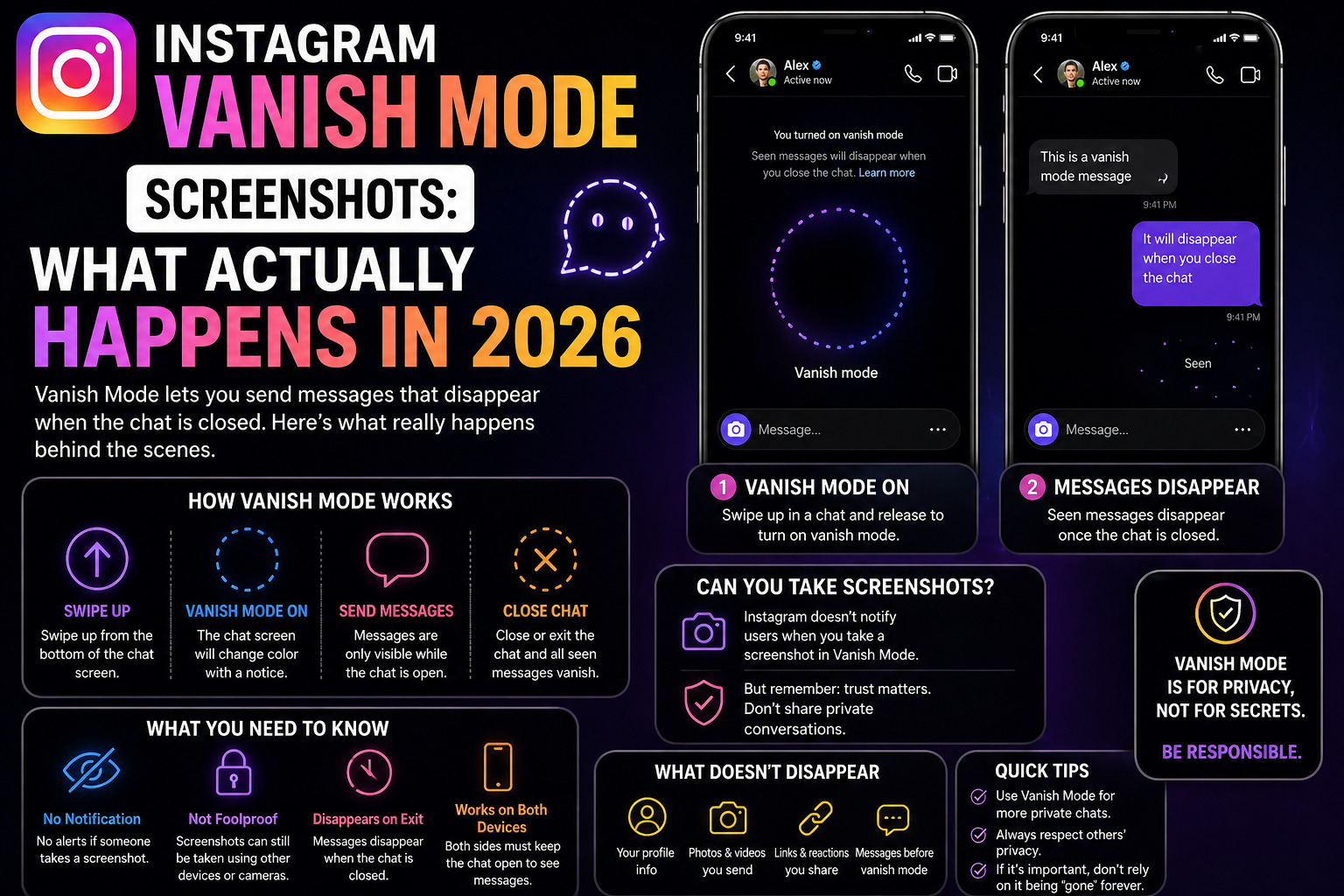
Instagram Vanish Mode Screenshot: What Happens, What the Alert Looks Like & 2026 Facts
Instagram Screenshot Guide› Vanish Mode & Disappearing Messages Deep Dive Companion Guide
The notification, how it works technically, whether workarounds exist, and what your rights are.
📅 Updated April 25, 2026⏱ 8 min read🔗 Part of the Instagram Screenshot Guide series
⚡ Quick Answer
If you screenshot a Vanish Mode conversation or a View Once message on Instagram, the sender is immediately notified. They see a camera icon and text that reads “[Your username] took a screenshot” directly in the chat. This applies to both iOS and Android, and cannot be disabled by either party. Everything else in regular DMs, text, camera roll photos, and voice notes generates zero notifications.
Part of a Larger Series
This is the companion deep-dive to our main pillar guide, covering every Instagram content type: Stories, posts, Reels, profiles, and all DM types.← Back to: Does Instagram Notify When You Screenshot DMs? 2026 Guide
Most articles on this topic give you the headline “Vanish Mode notifies” and move on. But if you’re reading this, you probably want to understand exactly what happens, what the notification looks like, why Instagram built it this way, and whether any of the workarounds people talk about on Reddit actually hold up in 2026.
Let’s go through all of it.
The Two Types of Disappearing Content on Instagram
Before we get into notifications, it’s important to separate two things that Instagram lumps under the “disappearing content” umbrella, because they behave slightly differently.
⚡ View Once / Allow Replay
- Individual photo or video in a regular DM
- Sent via the camera icon inside DMs
- Disappears after being opened once (or twice with Allow Replay)
- Chat thread remains otherwise normal
- Screenshot → notification for that specific message only
👻 Vanish Mode Chat
- The entire conversation becomes ephemeral
- Activated by swiping up in any DM thread
- All messages disappear after viewing and closing
- Screenshot of anything → notification
- Can be toggled off messages before toggle remain deleted
The practical implication: you could be in a perfectly normal DM thread with someone, they send you one View Once photo, and only that photo is protected. Screenshot the text above it? No notification. Screenshot that specific View Once image? Notification immediately.
What the Screenshot Notification Looks Like (Exactly)
This is something almost no article bothers to describe in detail. Here’s what you’ll actually see as the sender when someone screenshots your disappearing content:
📱 How it appears in the chat thread
📷Photo · View Once
Opened · Replayed
📸alex_rodriguez took a screenshot.
Key details about the notification:
- It appears inline in the chat thread, not as a home screen push notification
- It shows the exact username of who screenshotted
- It appears immediately, not with a delay
- It includes a camera-shutter icon for visual clarity
- The sender sees it the next time they open the chat (or immediately if the chat is open)
- There is no way for the sender to disable this notification
- There is no way for the recipient to prevent the notification from being sent
⚠️ Important
The notification does not expire. Even if the disappearing message is long gone, the screenshot alert remains visible in the chat thread. The sender has a permanent record that you screenshotted their content.
Why Instagram Can Detect This (The Technical Reason)
Ever wonder why Instagram can detect a screenshot of a disappearing message but not a regular DM? It’s not magic, it’s architecture.
Regular DMs work like permanent records. The media is downloaded to your device cache and treated as a standard attachment. Your device’s operating system handles screenshots at the OS level, completely outside Instagram’s awareness. Instagram never gets a signal that a screenshot occurred.
Disappearing messages work differently. The media isn’t downloaded to your device in the traditional sense; it’s streamed from Instagram’s servers under specific viewing conditions. Instagram maintains an active server-side session while you’re viewing the content. When your device triggers a screenshot event, the OS notifies the active foreground app (Instagram), which then relays that information to its servers.
💻 Technical Context
Both iOS and Android expose a screenshot detection API that apps can hook into while content is being displayed. Instagram specifically activates this listener only for disappearing content, not for regular DMs, Stories, or posts. This is a deliberate engineering choice, not a limitation. According to Apple’s UIKit documentation, apps can observe the userDidTakeScreenshotNotification even when they’re in the foreground.
This also explains why the “Airplane Mode workaround” was ever a thing. By cutting the connection before Instagram could sync the screenshot event to its servers, you could theoretically prevent the notification. Instagram has since addressed most versions of this exploit by caching the screenshot event locally and syncing it when connectivity restores.
The “Airplane Mode Trick” – Does It Still Work in 2026?
Let’s be direct: this is one of the most-asked questions on Reddit’s r/Instagram, and the honest answer is mostly no, and you shouldn’t rely on it.
Here’s the method people describe:
1 . Open the disappearing message without screenshotting
Let it load fully while connected.
2. Enable Airplane Mode immediately
Cut the connection before Instagram can sync anything to its servers.
3. Take the screenshot
With no connection, the screenshot event can’t be reported in theory.
4. Force-quit Instagram before reconnecting
The idea: kill the app before it can queue and send the event when connectivity restores.
⚠️ The Problem
Instagram updated its event-handling in late 2023 and again in 2025. In most versions of the current app, the screenshot event is queued locally the moment it’s detected, not just when network is available. Force-quitting doesn’t reliably clear that queue. When the app reopens and connects, the notification is sent. Do not use this as a justification for screenshotting someone’s private content.
What about screen recording, same rules?
Yes. Screen recording is treated identically to screenshots for all disappearing content. If you screen-record a View Once message or a Vanish Mode chat, the notification is sent exactly as it would be for a screenshot.
This includes third-party screen recording apps. Instagram detects the recording state at the OS level, not by monitoring which specific app is recording. Both iOS’s native screen recorder and Android’s built-in recorder trigger the same detection mechanism.
| Method | View Once / Vanish Mode | Regular DMs |
|---|---|---|
| Native screenshot (device button) | ⚠️ Notifies sender | ✅ No notification |
| Native screen recording | ⚠️ Notifies sender | ✅ No notification |
| Third-party screen recorder | ⚠️ Notifies sender | ✅ No notification |
| Screenshot with second device’s camera | ✅ Undetectable | ✅ No notification |
💡 Note on the “second device” method
Pointing another phone’s camera at your screen to photograph a disappearing message is technically undetectable. Instagram only monitors screen-capture events within the device OS. However, this is a significant breach of trust and potentially illegal depending on your jurisdiction and the nature of the content. It’s also of terrible quality.
Your Rights: When Screenshot Notifications Aren’t Enough
The notification tells the sender you screenshotted. What it doesn’t do is prevent you from keeping, sharing, or distributing that screenshot. Instagram’s technical enforcement ends with a notification.
But the law doesn’t. If someone shares screenshots of your intimate content without consent, you may have recourse under:
- Non-consensual intimate image laws (in effect in most US states, the UK, Canada, Australia, and the EU), sharing intimate images without consent, is a criminal offense in many jurisdictions
- Instagram’s own policies – you can report non-consensual intimate image sharing directly through Instagram’s NCII reporting flow, and Meta works with the StopNCII database to prevent rehashing.
- Copyright law – if the content is your own original creative work, the person who took the screenshot doesn’t automatically own it. You retain copyright in most jurisdictions.
A screenshot notification is a social signal, not a legal deterrent. Know your options.
Frequently Asked Questions: Vanish Mode Screenshots
What does the Instagram Vanish Mode screenshot notification look like?
It appears inside the DM thread as an inline alert, a camera icon alongside text reading “[Username] took a screenshot.” It’s not a push notification to the home screen. The sender sees it the next time they open the chat, or immediately if the chat is already open.
Does the Airplane Mode trick still work in 2026?
Not reliably. Instagram now queues the screenshot event locally when it’s detected. Force-quitting the app before reconnecting doesn’t consistently prevent the notification from being sent when the app restarts. This exploit is largely patched. Do not use it to justify screenshotting someone’s private content.
Can I turn off screenshot notifications for my View Once messages?
No. This is a platform-level feature that neither sender nor recipient can disable. If you send a View Once message and someone screenshots it, you will be notified that it’s not a setting; it’s part of how disappearing content works on Instagram.
Does Vanish Mode notification apply to text messages too, or just photos?
In Vanish Mode, the screenshot notification applies to the entire conversation, including text. In a regular DM with a View Once photo, the notification only triggers for that specific disappearing media, not for any text in the same thread.
If I screenshot a View Once message before it disappears, does it save the image?
Yes, the screenshot saves to your device’s camera roll as normal. Instagram cannot prevent your device from saving the image once a screenshot is taken; it can only notify the sender that it happened.
What if I screenshot the notification itself (the “[username] took a screenshot” alert)?
That’s a regular in-app chat element screenshotting it triggers no additional notification. Only the initial screenshot of the disappearing content is detected.
Need the Full Picture?
This guide covers Vanish Mode and View Once in depth. The pillar page covers every other content type: Stories, Reels, posts, Highlights, regular DMs, and more.← Full Guide: Does Instagram Notify When You Screenshot DMs? 2026
📚 Related on This Site
Main Guide: Does Instagram Notify Screenshots? Every Content Type Covered
How to Use Instagram Close Friends Without Oversharing
Instagram Privacy Settings Audit: What to Lock Down in 2026
Does Snapchat Notify Screenshots in 2026?
The Takeaway
Vanish Mode and View Once messages are the only corners of Instagram where screenshot notifications are real, immediate, and unavoidable. Instagram built these features deliberately; they carry an explicit social expectation of privacy, and the notification enforces that expectation technically.
If you’re the sender: know that the notification system isn’t foolproof. Someone could photograph your screen with another device. The notification is a deterrent and a record, not a lock.
If you’re the recipient: understand that screenshotting someone’s disappearing content without their knowledge, even if you wanted to, and even if a workaround technically existed, is a violation of the trust that feature was built on. Instagram’s policy reflects a clear social norm. Respect it.
For everything else on Instagram Stories, posts, Reels, regular DMs, and profiles, you have nothing to worry about. The platform is silent. That’s by design, and it’s been consistent for years.
Sources: Instagram Help Center · Meta Technologies · StopNCII.org · Apple UIKit Docs






Leave a comment